
Reading time: ~13 minutes
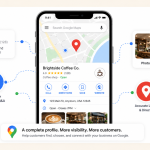
If you run a local business, your Google Business Profile (GBP) is doing more work for you than your website. It's the first thing people see when they search your business name. It's what shows up in the local map pack. And in 2026, it's increasingly what AI search engines pull from when answering questions like "best dentist near me" or "coffee shop open now."
Most GBP optimization guides give you a 50-item checklist and call it a day. The problem: half those items barely move your rankings, and the ones that actually matter usually get one bullet point of attention.
This guide is different. We'll cover the full checklist, but we'll be honest about what actually moves the needle versus what's just busy work. You'll know where to focus your limited time.
Here's what we'll cover:
Let's get into it.
Before we get tactical, you need to understand how Google actually ranks businesses on Maps and the local pack. Everything we cover later will tie back to these three pillars.
How well your profile matches what the person searched for. Did they search "vegan pizza"? Does your profile actually say you serve vegan pizza? Categories, business description, services, and attributes all feed into relevance.
How close your business is to the searcher. You can't change your address, but you can influence how Google understands your service area — especially if you're a service business that travels to customers.
How well-known and trusted your business is. Reviews, mentions across the web, citations, photo engagement, and overall profile activity all feed into prominence. This is where most of your optimization energy should go because it's where you have the most control.
One thing to know about 2026: the three pillars haven't changed, but how Google measures them has. Google's AI now factors in user engagement patterns, content freshness, and review sentiment more heavily than ever. A static profile from 2022 with great old reviews will lose to an active profile with steady recent activity.
If you haven't done this yet, this is step zero. You can't optimize what you don't own.
One tip if you have an old listing with stale info: claim it first, then update. Don't create a duplicate — duplicate listings hurt your rankings and confuse customers.
This sounds boring, but Google's data shows profiles with 100% complete and consistent information rank significantly higher than partially completed ones. The basics aren't optional — they're the foundation everything else sits on.
Use your actual business name. Nothing else. Don't add location ("Joe's Pizza Brooklyn NYC") or services ("Joe's Pizza — Best in Town"). Keyword-stuffing your business name violates Google's guidelines and can get your listing suspended. It used to work. It doesn't anymore — Google's spam detection caught up.
NAP stands for Name, Address, Phone number. This information needs to be identical across:
"123 Main Street" on one site and "123 Main St." on another counts as inconsistency to Google. Pick one format and use it everywhere. If you've moved or changed phone numbers, audit your old listings — outdated info confuses Google's understanding of your business.
This is one of the highest-impact settings you'll touch. Categories tell Google what searches you should appear for.
Quick research trick: search for your top 3 competitors who outrank you. View their GBP listings (browser extensions like GMB Everywhere will show you). Note their primary categories. If they're ranking and you're not, their category choice might be smarter than yours.
Keep these current. Special hours for holidays. Reduced hours during slow seasons. If a customer drives to your business based on Google saying you're open and finds you closed, that's a one-star review waiting to happen — and Google notices the bounce.
You get 750 characters. Use them. Write a natural, useful description of what you do, who you serve, and what makes you different. Include 1–2 location-based phrases naturally ("serving small businesses across Brooklyn since 2008") but don't keyword-stuff.
This description doesn't directly impact rankings the way categories do, but it influences click-through rate when your profile appears in search.
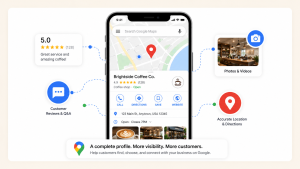
This is where most businesses fail and where the biggest opportunity sits. According to research, businesses with 100+ photos receive 42% more direction requests and 35% more website clicks than profiles with fewer than 10.
Most profiles have 3 blurry phone pics from 2019.
Variety is critical. Aim for at least 25–30 photos across these categories:
This is what separates competitive profiles from neglected ones: upload fresh photos at least every 2 weeks. Google's algorithm rewards recent activity. A profile that hasn't added a photo in 18 months looks dormant — even if the business is thriving.
Quick tip: when you take a photo on your phone for marketing, also upload it to GBP. Make it a five-second habit instead of a quarterly project.
Don't have time to manage all this?
GBP optimization rewards consistent activity — and that's exactly what most small business owners don't have time for. We manage Google Business Profiles for small businesses week in, week out. We'd be happy to take it off your plate.
Get help managing your GBP →Attributes are the checkboxes that say things like "Women-led," "Wheelchair accessible," "Free Wi-Fi," "Outdoor seating," "Accepts cryptocurrency," "Pet-friendly."
These used to be nice-to-have. In 2026, they're critical because AI search engines (Google's AI Overviews, ChatGPT, Perplexity) use them to answer specific user queries.
When someone searches "vegan-friendly Italian restaurants with outdoor seating in Sydney," the AI doesn't read your business description and guess. It checks attributes. If you didn't check the "vegan options" and "outdoor seating" boxes, you don't appear in that answer — even if you literally have both.
Important: only check attributes that are actually true. If you check "wheelchair accessible" but a wheelchair user can't enter your building, that customer leaves a one-star review — and Google penalises you twice (false attribute + bad review).
Action step: log into your GBP dashboard monthly and check for new attributes. Google adds new ones based on search trends. Missing them means missing emerging searches before your competitors find them.
Reviews influence both prominence (your ranking) and click-through (whether people actually choose you). They're roughly 15% of your local ranking signal — but they punch above that weight because they're the most visible thing about your profile.
Forget fake reviews. Google's detection is sophisticated, and fake reviews can get your listing suspended. Here's what actually works:
Reply to every review — positive and negative. Google's algorithm tracks response rate, and responding signals an active, engaged business.
Google rewards profiles that look like an active business. Posts and Q&A are how you signal that.
Posts appear on your profile and stay visible for 7 days. After that, they roll off. Treat them like mini blog posts or social updates:
Aim for at least one post per week. Consistency matters more than length.
The Q&A on your profile is something most business owners ignore — which means random people answer questions about your business instead of you.
If you don't measure, you can't improve. GBP has built-in performance reports that most business owners never look at.
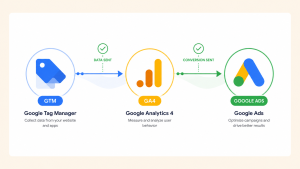
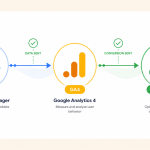
For deeper tracking, connect your GBP-driven website traffic to GA4 so you can see what those visitors actually do. If you haven't set up GA4 yet, our Google Ads Conversion Tracking with GTM & GA4 guide walks through the foundations.
Five things that catch out small business owners more than anything else.
"Mike's Plumbing — Best Emergency Plumber in Sydney 24/7 Cheap" is not a business name. It violates Google's guidelines and risks suspension. Use your actual business name.
"Doctor" is less effective than "Pediatrician." "Store" is far less effective than "Hardware Store." Specificity is what matches you to specific searches.
GBP rewards activity. A profile completed once and abandoned ranks worse than a partially-completed profile with regular updates. If you can only do one thing weekly, post once.
An unanswered negative review hurts twice. Once because of the original complaint, twice because your silence suggests you don't care. Always respond, always professionally.
Old phone numbers on old directory listings. An abbreviated address on Facebook. A different business name on Yelp. Audit your top 10 citations annually and fix discrepancies. Free tools like Moz Local or BrightLocal can scan for you.
Optimization isn't a one-time project — it's a habit. Here's a realistic schedule for a busy small business owner:
Google Business Profile in 2026 is no longer a "set it up and walk away" listing. It's an active marketing channel that rewards businesses that treat it like one. The good news: your competitors aren't doing this work. Most local businesses fall into the "claimed it once, never touched it again" camp. Showing up weekly puts you ahead of 80% of them.
Focus your energy where it actually moves the needle: complete the basics properly, get genuine reviews regularly, upload photos consistently, and update attributes for AI search visibility. The rest is supporting work.
If you're not sure where to start, pick the most impactful thing this week: ask your last five happy customers for a review. That single action will outperform most of the technical tweaks people obsess over.
GBP rewards consistent activity — posts, photos, review responses, attribute updates. We do this week in, week out for small businesses, so they can focus on running their business while their local visibility quietly grows.
Published by googlemarketing.io — helping small businesses get more out of Google Ads, Analytics, Tag Manager, and SEO.



Copyright 2026 Altic LLC All rights reserved.